Measured takeoff,
straight off the PDF.
Browser-based construction takeoff for measured drawings. Set scale once, measure areas, lengths and counts, then export classified, costed quantities — nothing to install.
£19.99 inc VAT per user / month after the 7 day trial.
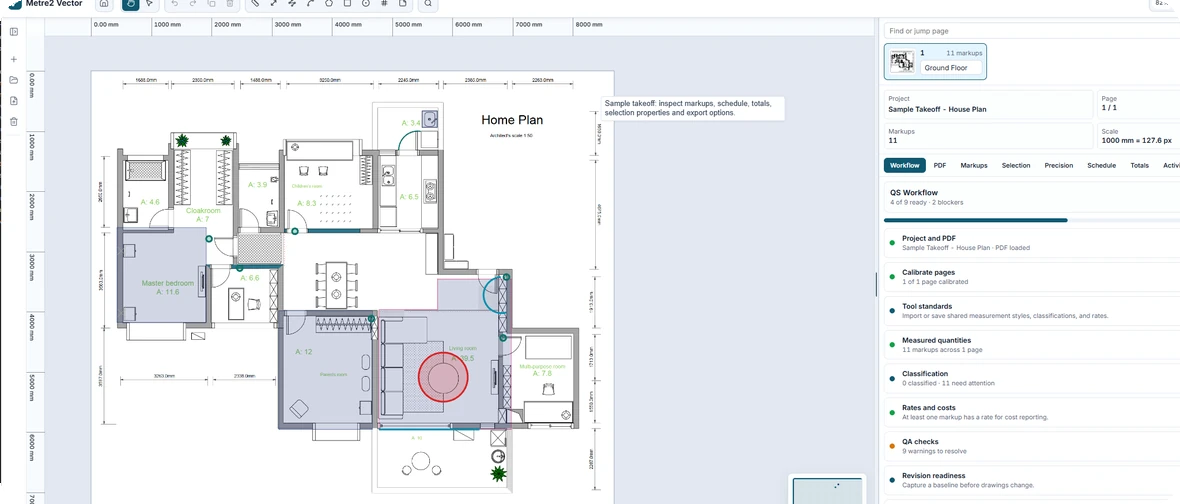
A takeoff workspace, not just a measuring tool
Vector keeps PDF review, calibration, markup, classification, totals and export in one fast browser workspace, so quantities stay traceable from drawing to report.
Shape takeoff
Trace areas, rectangles, circles and arcs with live geometry, editable vertices, dimensions, opacity and line styling.
Length and polyline
Follow walls, pipe runs, skirting and kerbs with snapping, ortho control, typed lengths and grouped totals.
Count and note tools
Drop count markers, add editable text notes, classify by trade, package and tag, then review everything in the markup list.
PDF-native workspace
Open vector and scanned drawing sets directly with crisp redraw, thumbnails, page metadata, baselines and drawing comparison.
Precision controls
Calibrate from a known dimension, use rulers, grid, snapping and checks to keep measurements consistent across the sheet.
Totals and exports
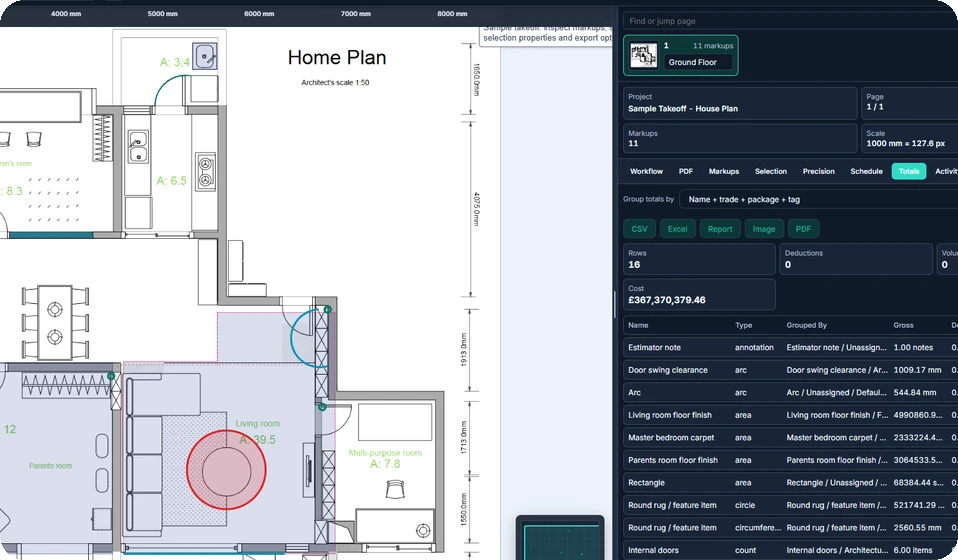
Group quantities by name, type, trade, package or tag, add rates, and export to Excel, CSV, report, image or marked PDF.
Three steps to a priced takeoff
Upload the set
Drag in your PDF drawings. Vector loads every sheet and keeps the original resolution intact.
Calibrate scale
Click a known dimension or pick the sheet ratio. Vector locks measurement units to the drawing.
Measure & export
Trace areas, runs and counts, then push grouped quantities straight to your estimate.
Every quantity traces back to the drawing
Vector keeps your measurements anchored to the sheet they came from, so a reviewer can see exactly what was counted and where.
- Snapping and ortho-lock for clean, repeatable lines
- Automatic deductions for openings and voids
- Colour-coded layers per trade and element
- Markups stay pinned to the source PDF coordinates
Modern takeoff without the desktop drag
Legacy desktop suites are broad, but they carry installs, licence friction and a workflow built around old habits. Vector is deliberately browser-native: fast to open, easy to learn, and already strong on measurement, classification, totals, exports and auditability.
| Capability | m2Metre2 Vector | Legacy desktop toolse.g. installed PDF takeoff suites |
|---|---|---|
| Runs in the browserNo install, works on any OS incl. Mac | – | |
| Always up to dateNo version upgrades or patches to manage | – | |
| Fast to learnFocused, modern takeoff workspace | Steep curve | |
| Transparent monthly pricingSimple subscription, cancel anytime | Per-seat licences | |
| Full markup toolsetLength, polyline, arc, area, rectangle, circle, count and notes | ||
| Grouped quantity totalsGroup by name, type, trade, package and tag | ||
| Excel, CSV and marked PDF exportSend quantities and marked drawings out of the browser | ||
| PDF-native renderingOpen drawing sets directly, crisp at any zoom | ||
| Scale calibration and snappingKnown-length calibration, rulers, grid, snap and typed length | ||
| Baselines and drawing compareCapture a revision state and compare drawing changes | ||
| Shared tool librariesCompany-level standards, symbols and reusable tool sets | Soon | |
| Real-time team collaborationMultiple people on the same sheet | Soon |
Estimators are switching to the browser
"I priced a two-storey fit-out in an afternoon. No install on the site laptop, and the totals dropped straight into our cost sheet."
"Calibration is the bit other tools get wrong. Vector locks to scale and the measurements just hold up in review."
"We dropped a per-seat desktop licence we barely used. Same takeoff, opens anywhere, costs a fraction."
One plan. Everything included.
Start with a 7 day free trial. No card surprises, cancel any time.
- PDF takeoff workspace
- Area, length, polyline, count, arc, circle and notes
- Excel, CSV, report, image and marked PDF exports
- Baselines, drawing compare, checks and grouped totals
What happens after the 7 day trial?
Your card is charged £19.99 inc VAT per user per month only when the trial ends. You can cancel any time before then and will not be billed.
Can I cancel any time?
Yes. Manage your subscription from your account and cancel before the next billing period.
Do my drawings stay private?
Your projects and PDFs stay in your browser workspace unless you export or package them.
What can I export?
Export grouped quantities to CSV, Excel and reports, plus images and marked PDF drawings.
Is there a team or volume rate?
Phase one is a simple per-user subscription. Team controls and volume billing can follow once the product shape is proven.
Start measuring in minutes
Open Vector in your browser, calibrate your sheet, and turn drawings into priced quantities without installing anything.